
CODE & CONSIGNES PUBLIÉS PAR LA SOURCE
=== ARCHITECTURE & VISION ===
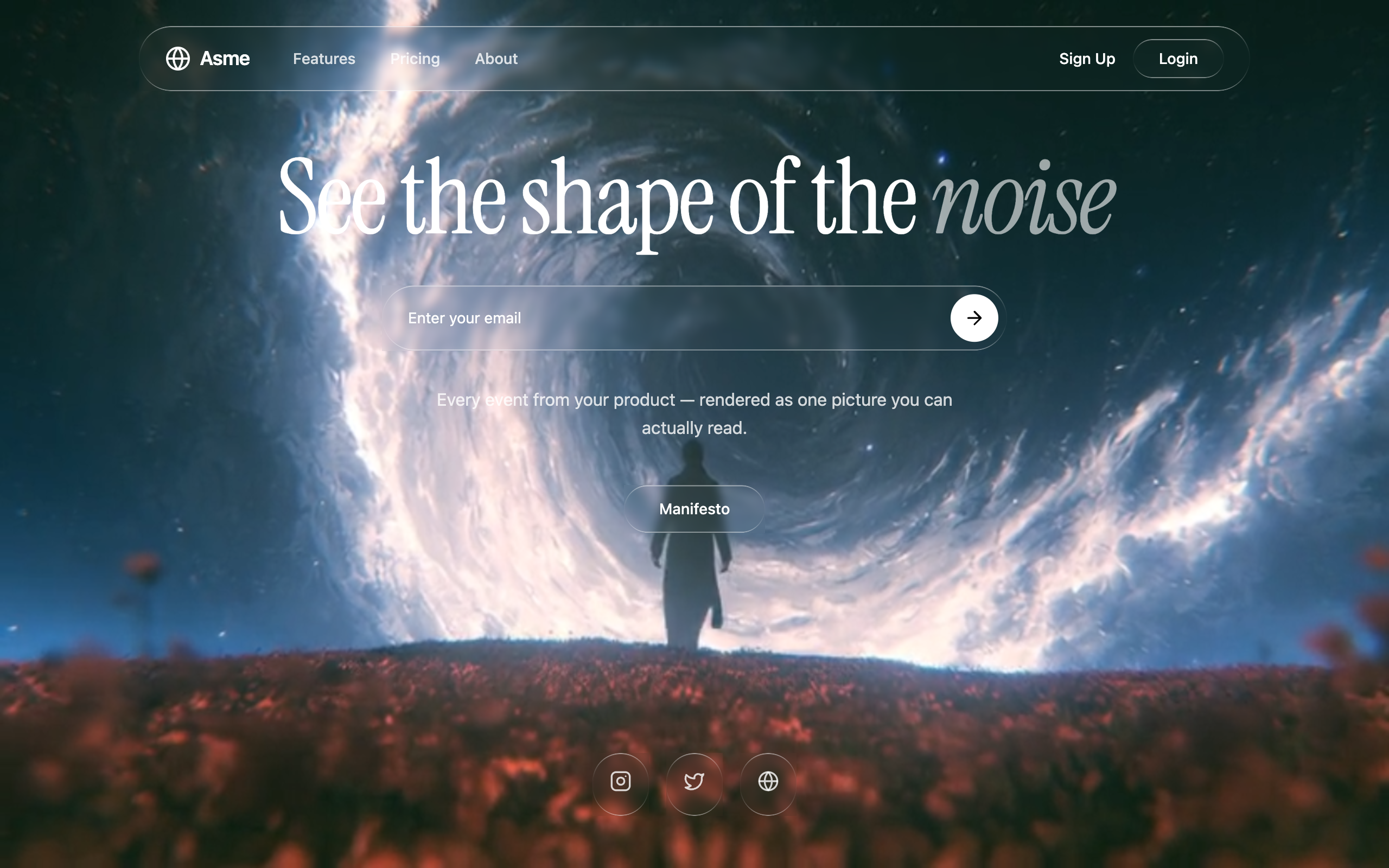
Observe is a high-fidelity design system utilizing a dark-mode, glassmorphic layout. It pairs the elegant Instrument Serif font with clean sans-serif UI elements. The design is anchored by 'Liquid Glass' containers that use background-blur and complex gradient borders to create a premium, tactile feel. It is designed to sit on top of high-contrast background videos without sacrificing legibility through the strategic use of multi-layered text shadows.

=== STYLE & DIRECTION ARTISTIQUE ===
• description:
• prompt: RECREATION PROMPT — OBSERVE

Build a single-screen waitlist landing page called **Observe**. Output one self-contained HTML file (~8 KB) — Tailwind from `https://cdn.tailwindcss.com`, Iconify from `https://code.iconify.design/iconify-icon/1.0.7/iconify-icon.min.js`. There is no scroll, no sections below the hero, and no footer: the whole page is one full-viewport screen over a looping background video.

Page title: `Observe — See the shape of the noise`

The entire page has a black background. The font loaded via Google Fonts is Instrument Serif (italic and regular), used **only** on the headline — everything else is the default sans. Import it at the top of the stylesheet:

```css
@import url('<https://fonts.googleapis.com/css2?family=Instrument+Serif:ital@0;1&display=swap>');

:root { --bg: #000000; --fg: #ffffff; }

.font-serif-instrument { font-family: 'Instrument Serif', serif; }
```

LIQUID GLASS CSS

Two classes. `.liquid-glass` for panels and pills; `.liquid-glass-circle` for the small round buttons.

```css
.liquid-glass {
  background: rgba(0, 0, 0, 0.10);
  background-blend-mode: luminosity;
  backdrop-filter: blur(8px);
  -webkit-backdrop-filter: blur(8px);
  border: none;
  box-shadow: inset 0 1px 1px rgba(255, 255, 255, 0.1);
  position: relative;
  overflow: hidden;
}

.liquid-glass::before {
  content: '';
  position: absolute;
  inset: 0;
  border-radius: inherit;
  padding: 1.4px;
  background: linear-gradient(
    180deg,
    rgba(255, 255, 255, 0.45) 0%,
    rgba(255, 255, 255, 0.15) 20%,
    rgba(255, 255, 255, 0) 40%,
    rgba(255, 255, 255, 0) 60%,
    rgba(255, 255, 255, 0.15) 80%,
    rgba(255, 255, 255, 0.45) 100%
  );
  -webkit-mask: linear-gradient(#fff 0 0) content-box, linear-gradient(#fff 0 0);
  -webkit-mask-composite: xor;
  mask-composite: exclude;
  pointer-events: none;
}
```

`.liquid-glass-circle` is identical **except** it has no `background` line at all, and its rim gradient never reaches zero opacity — on a 56px circle the base gradient's transparent band would erase the left and right of the ring and leave two disconnected arcs:

```css
.liquid-glass-circle {
  /* same as .liquid-glass, but with NO background property */
  background-blend-mode: luminosity;
  backdrop-filter: blur(8px);
  -webkit-backdrop-filter: blur(8px);
  border: none;
  box-shadow: inset 0 1px 1px rgba(255, 255, 255, 0.1);
  position: relative;
  overflow: hidden;
}

.liquid-glass-circle::before {
  /* same ::before as .liquid-glass, but this gradient instead: */
  background: linear-gradient(
    180deg,
    rgba(255, 255, 255, 0.45) 0%,
    rgba(255, 255, 255, 0.22) 30%,
    rgba(255, 255, 255, 0.16) 50%,
    rgba(255, 255, 255, 0.22) 70%,
    rgba(255, 255, 255, 0.45) 100%
  );
}
```

PAGE SHELL

`<body>` contains one wrapper:
`<div class="bg-black text-white min-h-screen selection:bg-white selection:text-black overflow-hidden">`
holding one `<section class="min-h-screen relative overflow-hidden flex flex-col">`.

Inside the section, in this order: video (behind everything), navbar, hero content, social row.

BACKGROUND VIDEO

```html
<video id="hero-video" class="absolute inset-0 w-full h-full object-cover object-bottom"
       muted autoplay loop playsinline preload="auto"></video>
```

Set the source and playback speed in a script at the end of `<body>`:

```html
<script>
  const video = document.getElementById('hero-video');
  video.src = "<https://designerstephen.github.io/public-assets/videos/observe-hero.mp4>";
  video.playbackRate = 0.5;
</script>
```

The video plays at **full opacity from frame one** and repeats using the browser's native `loop`. There is no fade, no crossfade, no `poster`, no CSS filter, no blur, no brightness change and no dark scrim over it. Nothing else on the page animates.
(Swap the URL for your own clip — it should be a slow, dark, abstract loop. The original is an 832×464 H.264 file, ~584 KB, encoded at CRF 22 with `-movflags +faststart` and no audio track.)

NAVBAR (`<nav class="relative z-20 px-6 py-6">`)

A glass pill: `<div class="liquid-glass rounded-full max-w-5xl mx-auto pl-6 pr-1.5 py-1.5 flex items-center justify-between">`

Left group (`flex items-center gap-2`):

1. The logo, inline SVG at `w-6 h-6`, using `currentColor` so it inherits white. It is a ring that resolves from noise into form — reading clockwise from the lower left, dots tighten into dashes, which fuse into a solid arc; the centre dot is the thing being observed:

```html
<svg viewBox="0 0 24 24" fill="none" xmlns="<http://www.w3.org/2000/svg>" aria-hidden="true" class="w-6 h-6">
  <path d="M4.21 16.5 A9 9 0 0 1 16.5 4.21" stroke="currentColor" stroke-width="2" stroke-linecap="round"/>
  <path d="M16.5 4.21 A9 9 0 0 1 19.79 16.5" stroke="currentColor" stroke-width="2" stroke-linecap="round" stroke-dasharray="2.4 2.3"/>
  <path d="M19.79 16.5 A9 9 0 0 1 4.21 16.5" stroke="currentColor" stroke-width="2.6" stroke-linecap="round" stroke-dasharray="0.01 4.7"/>
  <circle cx="12" cy="12" r="2.5" fill="currentColor"/>
</svg>
```

1. `<span class="font-semibold text-lg tracking-tight">Observe</span>`
2. `<div class="hidden md:flex gap-8 ml-8">` containing three links — **Product**, **Pricing**, **Contact us** — each `text-white/80 hover:text-white text-sm font-medium transition-colors`.

Right group (`flex items-center gap-4`):

- `<button class="text-white text-sm font-medium">Sign Up</button>`
- `<button class="bg-white rounded-full px-5 py-2 text-black text-sm font-medium whitespace-nowrap">Join Waitlist</button>` — a solid white pill, tight to its label.

HERO CONTENT

`<div class="relative z-10 flex-1 flex flex-col items-center justify-center px-6 py-12 text-center -translate-y-[20%]">` — centred and nudged up 20%. Vertical order is **headline → subline → email capture**.

Headline — one line, never wrapped, with a soft dark aura (not an offset drop shadow) so white type survives over bright frames of the video. The italic word is **full white**, same as the rest of the line:

```html
<h1 class="text-6xl md:text-7xl lg:text-8xl font-serif-instrument tracking-tight whitespace-nowrap mb-4"
    style="text-shadow: 0 0 72px rgba(0, 0, 0, 0.42), 0 4px 28px rgba(0, 0, 0, 0.28);">
  See the shape of the <em class="italic">noise</em>
</h1>
```

Subline — also one line on desktop, with a weaker aura, about half the strength and less than half the radius of the headline's. The dash is a real em dash:

```html
<p class="text-white/70 text-sm leading-relaxed max-w-2xl md:whitespace-nowrap mb-10"
   style="text-shadow: 0 0 30px rgba(0, 0, 0, 0.32), 0 1px 10px rgba(0, 0, 0, 0.20);">
  Every event from your product — rendered as one picture you can actually read.
</p>
```

Email capture — a glass pill with the CTA sitting flush inside it. No arrow icon; the placeholder is near-white for contrast against the video, and the input is `flex-1` so the placeholder can never run under the button:

```html
<div class="max-w-xl w-full">
  <div class="liquid-glass rounded-full pl-6 pr-1.5 py-1.5 flex items-center gap-3">
    <input type="email" placeholder="Enter your email"
           class="bg-transparent border-none outline-none flex-1 text-white placeholder:text-white/90 text-sm">
    <button class="bg-white rounded-full px-6 py-3 text-black text-sm font-medium whitespace-nowrap
                   hover:scale-105 transition-transform duration-300">Join Waitlist</button>
  </div>
</div>
```

SOCIAL ROW

`<div class="relative z-10 flex justify-center gap-4 pb-12">` with three identical buttons using `lucide:instagram`, `lucide:twitter`, `lucide:globe`. Explicit `w-14 h-14` rather than padding, so they can't go oval:

```html
<button class="liquid-glass-circle w-14 h-14 flex items-center justify-center rounded-full
               text-white/80 hover:text-white hover:bg-white/5 transition-all">
  <iconify-icon icon="lucide:instagram" class="text-xl"></iconify-icon>
</button>
```

HARD RULES

- **Monochrome only.** Black and white at varying opacity, zero accent hue anywhere. All colour on the page comes from the video.
- **Every shape is fully rounded** (`rounded-full`).
- **No drop shadows on surfaces.** The only shadows are the inset glass highlight and the two text auras.
- **No entrance animations, no scroll-reveals, no scroll.** The only motion is the looping video.
- Instrument Serif is for the headline only.

IF YOU WANT THIS AS A REACT APP INSTEAD (Ask user)

Same markup and same CSS, built with React + TypeScript + Vite + Tailwind + lucide-react. Put the two glass classes in `index.css` inside `@layer components`, use lucide-react icons in place of the Iconify tags, and set the video with `<video src={...} muted autoPlay loop playsInline preload="auto" />` as a real attribute rather than assigning `video.src` in script — the attribute lets the browser start preloading before the JS runs. Set `playbackRate = 0.5` in a `useEffect` on a ref.

=== STRUCTURE & SECTIONS ===
• description:
• prompts: [{"part":"","prompt":""}]

=== COMPOSANTS CLÉS ===
• {"component":"Liquid Glass Container","description":"A sophisticated glass panel with light-reactive borders.","prompt":"Apply 'backdrop-filter: blur(8px)' and 'background: rgba(0,0,0,0.1)'. Use a pseudo-element (::before) to create a 1.4px border with a multi-stop linear gradient (white-to-transparent-to-white) and apply 'mask-composite: exclude' so only the border remains. Add an inner box-shadow: inset 0 1px 1px rgba(255,255,255,0.1)."}
Superdesign UI · Texte publié par la source. Les références et réglages peuvent être nécessaires ; le résultat identique n’est pas garanti.
La source est indiquée pour consulter le contexte et les conditions de réutilisation.
← Continuer à explorer